
Faceted Search
Website Product Faceted Search This feature is an available Beta Feature. You will be able to opt-in
Enter whatever you're curious about and we'll give you a smart summary of the best answers as well as relevant articles.

 August 31, 2026
August 23 – August 29, 2026
Stash It Shipping Service Added to Domestic Shipping List
Stash It has been added as a shipping method option in the Domestic Shipping name list, giving you the ability to offer it as an option at Register checkout and on the website. You can filter for the new method in the Orders list, as with other shipping options.
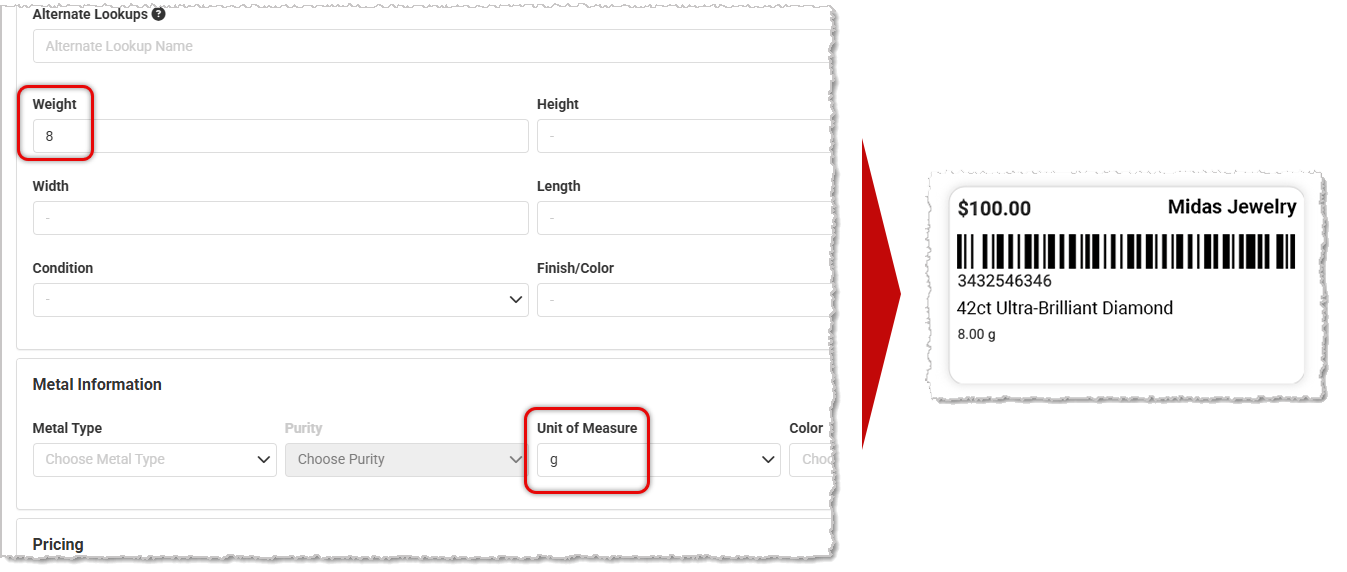
Unit of Measure Added to Weight for Label Printing
Custom labels that included a weight field previously printed only the number with no unit of measure attached. Weight labels now display the appropriate unit (such as grams or dwt) alongside the value at print time, for stores with the jewelry Metal Info section enabled. The Metal Information section can be hidden or displayed by going to Settings > POS > Products.
Customer Group-Restricted Coupon Applying Discount to Ineligible Customers Online
We have resolved an issue where a Coupon restricted to a specific Customer Group was still applying its discount at online checkout for customers outside that group, even though the Coupon displayed as not eligible.
Voided Web Orders Not Properly Voiding for Stores Using Stripe Payfac
We fixed an issue where voiding web transactions wasn't properly moving the transactions from regular reports to the Voided Transactions report for stores using the Stripe Payfac. We're in the process of running a script to update all affected transactions.
Newly Created Store Unable to Upload Product Images
We have fixed an issue where, in some rare cases, newly created stores were unable to upload product images due to some glitches occurring during the store creation process.
Redeemed Reward Coupons Incorrectly Displaying as Not Redeemed
We resolved an issue where already-used Reward Coupons were being labeled as Not Redeemed in the customer profile, making it appear that a customer could still apply a Coupon that had already been used. This was a display issue only — the Coupons were correctly blocked in the Register.
Comparison Report Filters Not Closing When Other Filters Are Clicked
We've fixed an issue in the Comparison Report and similar filter drop-lists where an open filter would remain open when you clicked a different filter, causing overlapping and cluttered drop-list behavior. The underlying click-outside detection logic now correctly closes the previously open filter when a new one is clicked.
Website Orders Not Sending Transaction ID to Payment Dashboard
We've resolved an issue for stores using Adyen as their payment processor, where web transactions weren't displaying their Transaction ID in the payment dashboard, showing only an internal reference identifier instead, making it difficult to reconcile payments. We now send the store's transaction ID as the external payment ID to Adyen after payment capture, so it can be properly traced back within the payment dashboard.
Register Not Reflecting Line-Item Discounts in Special Order Deposits
We corrected an issue where a Special Order with line-item discounts applied would calculate the deposit amount using the pre-discount total. Fulfilling the order without saving first caused the Register to only partially recognize the payment, leaving a false outstanding balance after pickup.
Wishlist Without Customer Still Displaying as Active
We have resolved an issue where, if a customer record was deleted, any Wishlists tied to that customer remained in the system with no name attached, cluttering the Wishlists module with blank-looking entries.
Join the Discussion
Have you joined the Jewel360 User Forum yet? You can take a look here!
That's all for this week. Thank you for being part of the Jewel360 family. Take care, we love you!!
Is this page helpful?
×Help us improve our articles