
Faceted Search
Website Product Faceted Search This feature is an available Beta Feature. You will be able to opt-in
Enter whatever you're curious about and we'll give you a smart summary of the best answers as well as relevant articles.

 June 22, 2026
June 14 – June 20, 2026
Nothing New This Week
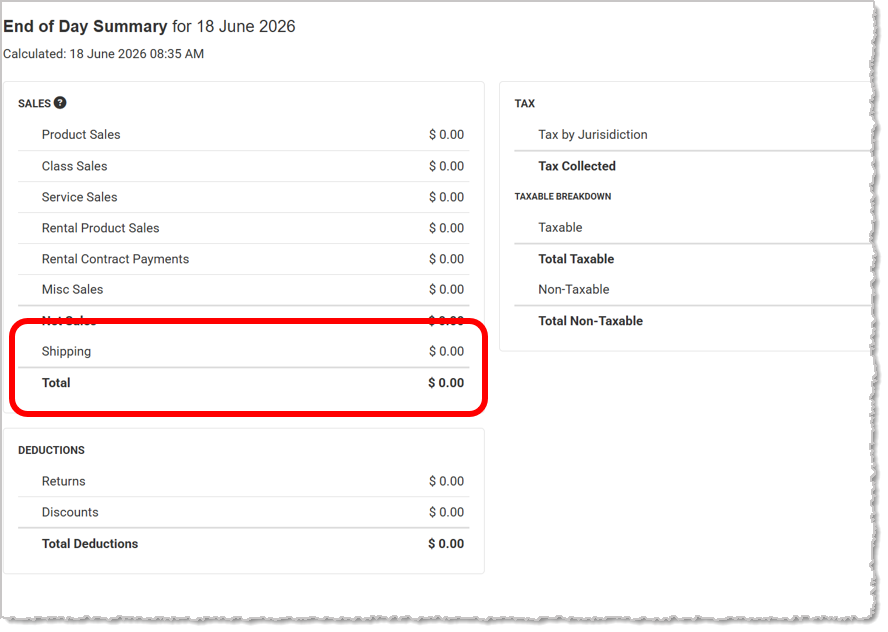
Enhanced Shipping & Tax Reporting
Shipping charges now appear in their own dedicated section with separate totals, instead of being grouped into sales figures. Taxable shipping amounts and shipping taxes are also shown independently, giving you a clearer breakdown of sales, shipping, and tax activity.
Inventory Report "Select All" Toggle Incorrectly Deselecting Items
We fixed an issue in the Inventory Report where using "Select All" would deselect all selected items instead of selecting the full list. The toggle now correctly applies selection across all visible items.
Form Style Receipts Not Consistently Displaying Line Item Tax
We resolved an issue where Form Style receipts could hide the tax column per line item, causing discrepancies between visible line totals and expected calculations. Tax is now consistently displayed to avoid confusion when reviewing itemized totals.
Configured Starting Invoice Number Not Applying to New Invoices
We have fixed an issue where updating your Invoice numbering settings had no effect on newly created Invoices. New Invoices now correctly follow your configured Invoice numbering sequence.
Sales by Item Report Showing Single-Location On Hand Quantities
We've resolved an issue in the consolidated Sales by Item Report where On Hand quantities displayed values from a single location instead of the combined total across all locations. The report now correctly aggregates On Hand quantities for multi-location stores.
Metal Buy Not Loading All Transactions in Set Date Range
We corrected an issue where setting a date range on the Metal Buy page caused some transactions to not appear due to a page scrolling problem. Transactions now load correctly when a date range is set.
Join the Discussion
Have you joined the Jewel360 User Forum yet? You can take a look here!
That's all for this week. Thank you for being part of the Jewel360 family. Take care, we love you!!
Is this page helpful?
×Help us improve our articles