System Updates
December 14, 2025 - January 3, 2026
New
Nothing New This Week
Improved
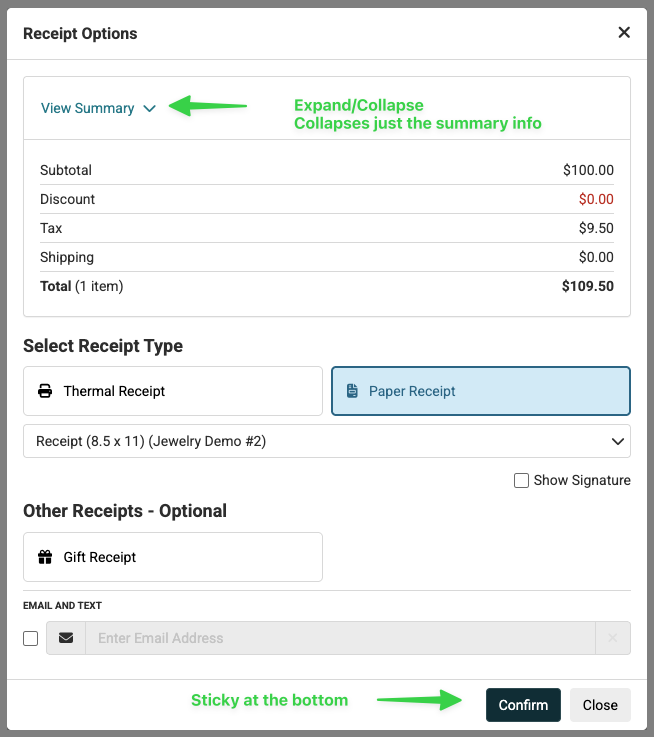
Improvements to the New Print Window in the Register
Due to some screen resolutions being lower, the new Receipt Options window occasionally needed to be scrolled to view everything. To prevent some of this scrolling we have made the transaction Summary area collapsible so that it is only visible when desired and saves room. We've also made the bottom action buttons 'sticky', so they are always visible.
Customer Marketing Opt-Out / Deselect All
Added the ability to opt out a customer from all marketing emails or deselect all marketing emails from the Edit Customer window.
Fixed
Search Results Not Returning SKUsWe resolved an issue where searching by SKU did not consistently return the correct item across search bars (including Transfers, Register, and Product List page). In some cases—especially when copying and pasting a SKU—the item would not appear or would fail to surface at the top of results. We have improved search behavior to ensure SKUs reliably return and display as expected.
Wrong Coupon Calculations at Web CheckoutWe fixed an issue where a coupon's discount was calculating incorrectly once an item with a sale price was also added to cart.
Messages Not Showing Up in Clientbook Using Request Review FeatureWe resolved an issue where messages sent from Request Review did not correctly match a customer in Clientbook when only a phone number or email was entered instead of full customer details.
Special Characters Not Allowed for Coupon CodesWe have fixed an issue where special characters were not allowed to be used as part of a coupon's code from the new beta Coupons list page.
Completed Purchase and Receiving Orders Not Showing DetailsWe fixed an issue where from the Edit Product page inventory history, opening a Receiving Order was not providing RO details: all fields were blank. Deleted purchase orders were causing this, and we implemented 'soft' deletion of ROs which will retain the RO information even if the PO is deleted.
Inventory Quantity Incorrect After Product SavePreviously, if the product page was open in one browser tab, and in a separate tab, a transaction was completed with the product that was open, after the transaction, when the user returned to the product page window and saved the product, the system was incorrectly adding back the quantity that was sold in the Register. We have fixed this issue.
Condition on Serialized Items Not SavingWe fixed an issue where editing the Condition on a serialized product was not saving on the Edit Product page.
Manual Inventory Adjustments Removing Received ItemsWe've fixed an issue where the system automatically was making manual adjustments to products after they were received - reducing or adding quantities.
Customers Missing Jewelers Mutual® Care PlansWe resolved an issue where transactions were recording the sale of a Care Plan, but when looking at the customer, no Care Plan was showing as attached.
Report Dates InaccurateWe fixed an issue where report dates did not match the store’s local time. Reports grouped by transaction date and payout date now correctly use the store’s time zone, ensuring all dates and totals display accurately.
Continue Receiving Button Missing in Purchase OrderWe've resolved an issue where in some situations the Continue Receiving button in a Purchase Order was hidden when it should be accessible.
Email Field Not Editable in Print WindowWe fixed an issue where when pulling up a transaction to send an email the email field was not editable.
Rounding Applying to Credit Card TransactionsWe have fixed an issue where transactions were rounding when making the payment with credit cards.
Duplicate ShipStation LabelsWe fixed an issue where clicking Print Shipping Label multiple times would create duplicate ShipStation labels. The system now creates only one label per order, unless the order is modified—at which point a new label will be generated after clicking Print Shipping Label button.
SSL Not Recognized When Clicking Email LinksSome customers report seeing "Unsafe" site errors when clicking emailed links from our system. We have put some extra measures in place to ensure that this won't happen when a store has SSL enabled.
Items Duplicate When Resuming TransactionWe fixed an issue where items are duplicating when resuming certain suspended transactions.
Shopify Shipping Amount DiscrepancyWe resolved an issue where shipping amounts from Shopify transactions were imported incorrectly, causing a mismatch between Shopify and our system. Shipping values are now imported accurately and match the original transaction.
Join the Discussion
Have you joined the Jewel360 User Forum yet? You can take a look here!
That's all for this week. Thank you for being part of the Jewel360 family. Take care, we love you!!


 January 05, 2026
Is this page helpful?
×Help us improve our articles