
Faceted Search
Website Product Faceted Search This feature is an available Beta Feature. You will be able to opt-in
Enter whatever you're curious about and we'll give you a smart summary of the best answers as well as relevant articles.

 November 03, 2025
System Updates
October 26 - November 1
New
Nothing New This Week
Improved
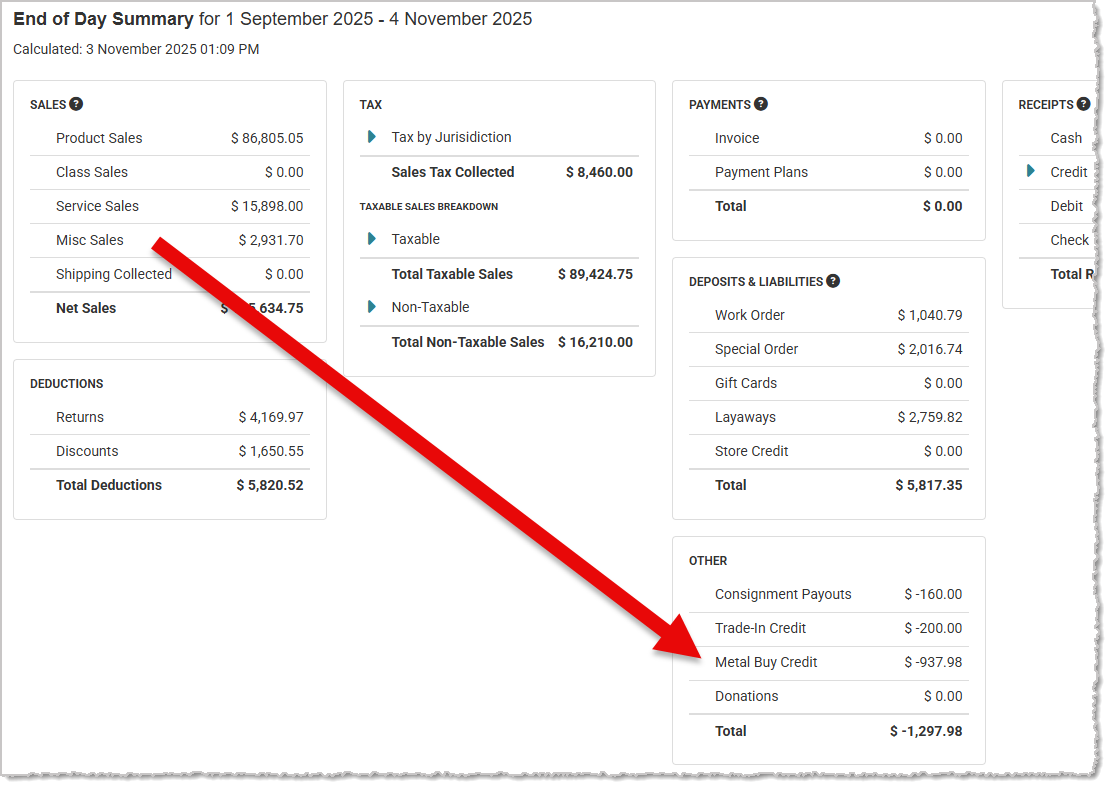
Metal Buy Moved in End of Day Report
Metal Buy transactions have been removed from the Misc Sales section of the End of Day report and they will now have their own sales classification and appear in the Other section of the report. Please note, Metal Buy transactions will only appear in the new version of the End of Day report. You can change the view by clicking the toggle at the top of the report.
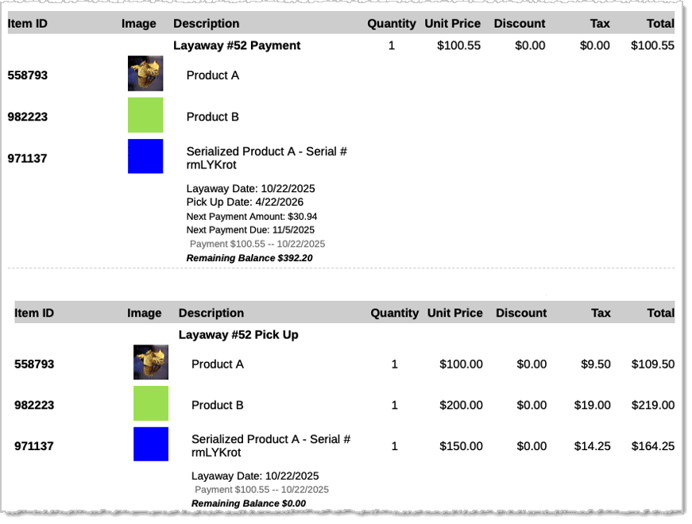
Improvements to Layaway Items on the Receipt Form Style
We’ve updated the print information on Layaway items in the Receipt Form Style to display more information and make them easier to read. Here is what we've improved:
Fixed
Complete Loaner On Work Order Pickup
We resolved an issue where picking up a Work Order with a Loaner item was not closing out the loaner, leaving it marked as overdue and still reserved.
Geller Blue Book Commissions Update
We have fixed an issue where the proper commission percentages were not being assigned to Geller Blue Book services. Geller services now use the percentage assigned to services under the POS Settings > Commissions > Universal Commissions.
Memo Status Not Correct On Stones Export
When exporting the Stones Inventory list page, the Memo status was not exporting correctly, resulting in all stones being listed as Non-Memo. We have fixed this issue and stones export correctly.
Variant Prices Updating Incorrectly
There was an issue where updating an item price sometimes caused variant prices to shift or swap between styles after saving. Pricing changes now apply only to the selected model, and all variant prices remain stable and accurate.
Some Online Canadian Taxes Not Being Charged
We resolved an issue where certain customers were able to bypass tax calculation on online orders. This occurred despite correct tax and customer profile configurations, affecting multiple customers and orders. We have fixed this, and it was only affecting customers in Canada.
Missing JM® Care Plans on Assembled Product Discounts and Sales
Previously, when using the Assemble feature and adding a discount or a sale price, the care plan was using the original price of the product instead of the discounted or sale price. This was causing the wrong JM® Care Plan to attach and nothing was created on the JM® side. This also created an issue on returns because there was no JM® Care Plan to return, causing an error in the system. We have fixed this issue.
Variant Data Not Saving Correctly
We fixed an issue where new variants wouldn't save and sometimes would become blank after clicking out of data entry fields.
Website Editor Not Scaling Images
We've fixed an issue where large images were not scaled properly in the website content editor, preventing users from accessing the web editor’s buttons.
New Customer Email Subscription Edits Not Saving
We fixed an issue where changes to a customer’s email subscriptions during creation were not being saved.
Join the Discussion
Have you joined the Jewel360 User Forum yet? You can take a look here!
That's all for this week. Thank you for being part of the Jewel360 family. Take care, we love you!!
Is this page helpful?
×Help us improve our articles